- Home Page /
- Electronics /
- Computer Accessories /
- Computer Accessories & Peripherals /
- Computer Hard Drive Accessories /
- Enclosures /
- MOKiN 40Gbps M.2 NVMe SSD Enclosure, Thunderb...
0 ratings


Item #:
222690223
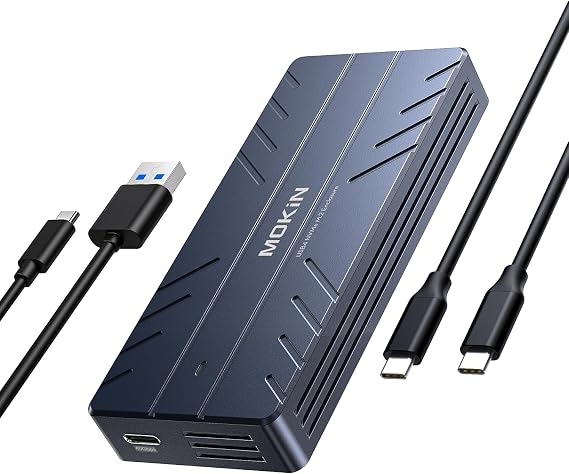
MOKiN 40Gbps M.2 NVMe SSD Enclosure, Thunderbolt for M1 Pro/Max Mac
90% of respondents would recommend this to a friend
Item #:
222690223
XCD 174
Price Details
Excluding Shipping & Custom charges ( Shipping and custom charges will be calculated on checkout )
*All items will import from US
0 ratings
Write a review
In stock
 Imported from USA store
QTY:
Order now and get it around Thursday, September 03
Secured transaction
Ubuy works hard to protect your security and privacy. Our advanced payment security system ensures confidentiality by encrypting your information during transmission using AES (Advanced Encryption Standards) and SSL (Secure Socket Layer) protocols. Your payment details are 100% secure as we do not share your payment details with third party sellers.
Our Top Logistics Partners


Just press and hold the Offline Clone button for 3 seconds, and easily clone all various files without connecting to a computer.

Fast
Shipping

Free
Return*

Secure Packaging

100% Original Products

PCI DSS Compliance

ISO 27001 Certified



What Stands Out
Ultra-Fast Transfer
Offers 40Gbps data transfer speeds, ensuring quick access to your files and efficient performance for demanding tasks like video editing or gaming.
Advanced Cooling System
Equipped with a cooling fan, this enclosure prevents overheating, maintaining optimal performance during intensive operations and enhancing the longevity of your SSD.
Broad Compatibility
Supports multiple key sizes including M/B and M keyed SSDs, ensuring seamless integration with various devices, including the latest Mac models and Thunderbolt compatible systems.
Product Details
| Hardware Interface | Thunderbolt, USB |
| Hardware Platform | x86_64 |
| Compatible Devices | Desktop, Laptop, Personal Computer, Mackbook, Mackbook Pro, Tablet |
| Data Transfer Rate | 40 gigabits_per_second |
| Connectivity Technology | USB |
| Color | Slate gray |
| Enclosure Material | Aluminum |
| Brand | MOKiN |
| Unit Count | 1 Count |
| Manufacturer | MOKiN |
| Model Number | UD1102 |
| Mfr Part Number | UD1102 |
| Material | Aluminum |
| Item Weight | 0.5 lbs (230 grams) |
Who Should Buy?

-
Tech Enthusiasts
Ideal for users who frequently upgrade or clone SSDs, providing a quick and efficient solution.
-
Data Backup
Perfect for individuals needing reliable offline backup solutions for important files without a computer.
-
Mac Users
Designed to support various MacBook models, making it ideal for Apple ecosystem users.

-
Casual Users
Not suitable for users who rarely clone or upgrade SSDs and prefer simpler solutions.
Product Description
MOKiN 40Gbps M.2 NVMe SSD Enclosure, Thunderbolt for M1 Pro/Max Mac
Have any Query? Chat with us
Customer Questions & Answers
-
Question:
What is a Dual-Bay Offline Clone Tool-Free NVMe M.2 SSD Enclosure?
Answer: A Dual-Bay Offline Clone Tool-Free NVMe M.2 SSD Enclosure is a device that allows you to easily install and access two M.2 NVMe SSDs simultaneously. This enclosure features tool-free installation, meaning that users can insert or remove drives without special tools. It enables you to clone data from one SSD to another without needing a computer, which is particularly useful for backups or drive upgrades. -
Question:
Is this enclosure compatible with MacBook M4ProMax and Mac Mini?
Answer: Yes, this enclosure is designed to be compatible with the MacBook M4ProMax and Mac Mini. It supports NVMe PCIe drives, ensuring high-speed data transfer, which is essential for users who depend on efficient workflow on their macOS devices. The enclosure harnesses the 40Gbps USB4 technology, optimizing performance ideal for demanding tasks like video editing or large file transfers. -
Question:
What is the significance of the 40Gbps USB4 interface?
Answer: The 40Gbps USB4 interface provides incredibly fast data transfer rates, making it ideal for high-performance applications. This speed is especially beneficial for professionals who manage large files, as it reduces the time required for data transfers and backups. In real-world scenarios, it means quicker loading times for applications and significantly quicker clone operations without bottlenecks. -
Question:
Does the enclosure come with a cooling fan, and why is it important?
Answer: Yes, this enclosure features a built-in cooling fan, which is crucial for maintaining optimal operating temperatures for your SSDs. High-performance SSDs can generate heat during use, and the cooling fan helps mitigate potential overheating issues. This ensures the longevity and reliability of your drives, especially during intensive data tasks like cloning or extended file transfers. -
Question:
Can I clone SSDs using this enclosure without a computer?
Answer: Absolutely! One of the standout features of this Dual-Bay enclosure is its offline cloning capability, enabling you to clone the contents of one SSD to another directly. This is particularly useful when upgrading to a larger drive or backing up important data without needing to connect to a computer. Simply insert both drives into the enclosure, select the cloning function, and the process begins. -
Question:
What types of M.2 NVMe SSDs can I use with this enclosure?
Answer: This enclosure is compatible with M.2 NVMe PCIe SSDs in 2230, 2242, 2260, and 2280 form factors. This versatility allows you to use a wide range of SSDs from various manufacturers. For example, you can easily swap out drives to accommodate different storage needs, whether for gaming, creative work, or general storage solutions. -
Question:
How do I install SSDs in the enclosure?
Answer: Installation is straightforward and tool-free. Simply slide open the enclosure, insert the M.2 NVMe SSDs into the designated slots, and secure them in place using the provided clasp. There's no need for screws or additional tools, making it accessible for users of all skill levels. This user-friendly design allows quick access to your SSDs for upgrades or data management. -
Question:
What are the benefits of using an NVMe SSD vs. a traditional SSD?
Answer: NVMe SSDs offer significantly faster read and write speeds compared to traditional SATA SSDs. This speed is vital for tasks such as video editing, gaming, and running virtual machines, where swift data access directly affects performance. Users transitioning from SATA to NVMe in this enclosure will experience noticeable improvements in application loading times and overall system responsiveness. -
Question:
What is the maximum capacity of SSDs supported by this enclosure?
Answer: This Dual-Bay enclosure supports SSDs with capacities up to 8TB per bay, allowing you to have a total storage capacity of 16TB. This is particularly beneficial for users needing extensive storage for large files, such as high-resolution videos, graphics, and extensive datasets. The substantial capacity makes it suitable for both professionals and avid gamers. -
Question:
Where can I buy the Dual-Bay Offline Clone Tool-Free NVMe M.2 SSD Enclosure?
Answer: You can purchase the Dual-Bay Offline Clone Tool-Free NVMe M.2 SSD Enclosure on Ubuy. Ubuy offers a reliable platform with a variety of products, ensuring you get the quality and service you deserve while meeting your tech needs.
MOKiN Enclosures UD1102 Editorial Review
The Mokin NVMe enclosure has garnered a positive reception among customers, particularly praised for its innovative design and reliable performance. Many users highlight the straightforward installation process, noting that the rubber clip system not only works effectively but also simplifies the connection of the M.2 NVMe drives, especially compared to the more complex mechanisms of previous enclosures like those from Sabrent. Customers appreciate the efficiency of the enclosure—many report achieving transfer speeds close to the maximum capabilities of their NVMe drives when utilizing the USB-C 10Gbps connection. In terms of versatility, the enclosure's ability to accommodate both SATA and NVMe drives has been seen as a significant advantage, although some users have yet to fully test its compatibility with SATA. The product's form factor and ergonomic design have also received accolades, with users finding it tailored for user convenience. Despite a few minor faults, such as inConsistent performance across different computer systems and the potential need for additional thermal management, the product seems to meet user demands effectively. The enclosure has proven itself capable of handling large data transfers without notable performance drops, making it an appealing choice for anyone needing reliable storage solutions. Repeated purchases by satisfied customers further emphasize its reliability and performance. In summary, the Mokin NVMe enclosure stands out for its user-friendly installation, compact design, and competent data transfer speeds. For those seeking a solid external storage option, this enclosure is a highly recommended choice. **
Customer Reviews & Ratings
1 customers ratings
-
5 Star
100%
-
4 Star
0%
-
3 Star
0%
-
2 Star
0%
-
1 Star
0%
Review this product
Share your thoughts with other customers
Pros
- Easy installation and user-friendly design.
- Efficient rubber clip system for securing drives.
- Excellent transfer speeds, close to drive capabilities.
- Compact and ergonomic form factor.
- Good compatibility with both SATA and NVMe drives.
- Repeated purchases by satisfied customers, indicating reliability.
Cons
- Performance may vary depending on the computer system.
Platform Trust & Buyer Confidence

MA
Mohammad
Verified buyer
“Excellent quality and original too,when ubuy send original things I will appreciate that ,I very satisfied thank you”
23 July 2026 · via Trustpilot
CK
Chitra
Verified buyer
“The order and delivery progress was communicated very well. Package arrived within the estimated time. Products arrived as expected in good condition.”
22-Jul-26 · via Trustpilot
K
kund
Verified buyer
“Good supply of products. Safe payment methods, and shipment worldwide! Genuine products.”
23-Jul-26 · via Trustpilot
OO
Onesi
Verified buyer
“Was my first time buying a product from Ubuy, but I found it so helpful. This is reliable. Gonna place a new order!”
22 July 2026 · via Trustpilot
SJ
SAO JOHN
Verified buyer
“Ubuy is a great online platform to buy stuff. Reliable, fast delivery time and great value for money. I've been using Ubuy online shopping platform for three years now and will continue to do so.”
23 July 2026 · via Trustpilot
Secure Checkout
Global Delivery
Easy Returns
Genuine Products
Product Price History
Important information
- Limitations : For products shipped internationally, please note that any manufacturer warranty may not be valid; manufacturer service options may not be available; product manuals, instructions, and safety warnings may not be in destination country languages; the products (and accompanying materials) may not be designed in accordance with destination country standards, specifications, and labeling requirements; and the products may not conform to destination country voltage and other electrical standards (requiring use of an adapter or converter if appropriate). The recipient is responsible for assuring that the product can be lawfully imported to the destination country. When ordering from Ubuy or its affiliates, the recipient is the importer of record and must comply with all laws and regulations of the destination country.
- Not all the products listed on Ubuy are for sale, as Ubuy is a global search engine. Products are subject to export/trade regulations.
XCD 174
Order now and get it around Thursday, September 03
This item is not restrict in my country.(Please click on above link if this item is not restrict in your country, So our team will review and allow.)
QTY:
Secured transaction
PCI DSS compliant and ISO 27001:2022 certified, with encrypted payments and full buyer protection on every order.
Our Top Logistics Partners
Fastest cross-border delivery
Features & Benefits
- Effortlessly clone files with a 3-second button press.
- Upgrade your computer maintenance operations with this dual-bay M.2 duplicator.
- Automatic heat dissipation ensures your hard drive remains secure.
- Experience blazing-fast data transmission speeds of up to 40Gbps.
- Tool-free design allows for quick installation with no additional tools needed.
- Compatible with multiple operating systems, including Windows, Linux, and Mac OS.
Ubuy Assurance
Experience worry-free shopping with 100% original products, PCI DSS-compliant payment security, ISO 27001-certified data protection, the fastest cross-border delivery, free returns *, and secure packaging on every order.