- Home Page /
- Electronics /
- Computer Accessories /
- Computer Accessories & Peripherals /
- Computer Hard Drive Accessories /
- Docking Stations /
- StarTech.com Standalone Hard Drive Duplicator...
0 ratings



Item #:
114139998
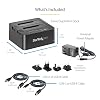
StarTech.com Standalone Hard Drive Duplicator, External Dual Bay HDD/SSD Cloner/Copier, USB to SATA III Docking Station
Item #:
114139998
XCD 366
Price Details
Excluding Shipping & Custom charges ( Shipping and custom charges will be calculated on checkout )
*All items will import from US
In stock
 Imported from USA store
QTY:
Order now and get it around Friday, June 26
Secured transaction
Ubuy works hard to protect your security and privacy. Our advanced payment security system ensures confidentiality by encrypting your information during transmission using AES (Advanced Encryption Standards) and SSL (Secure Socket Layer) protocols. Your payment details are 100% secure as we do not share your payment details with third party sellers.
Our Top Logistics Partners


This high performance dual eSATA dock lets you duplicate/clone hard disk drives without a host computer, maximizing efficiency with speeds up to 22 GB per minute.

Fast
Shipping

Free
Return*

Secure Packaging

100% Original Products

PCI DSS Compliance

ISO 27001 Certified


What Stands Out
Dual Bay Design
Simultaneously clone or replicate two hard drives, reducing time and increasing efficiency for data backup or recovery tasks compared to single bay options.
High-Speed Interface
USB 3.0 and eSATA connectivity ensures up to 5 Gbps data transfer rates, making it faster than traditional USB 2.0 duplicators, ideal for large files and quick backups.
Versatile Compatibility
Supports both 2.5” and 3.5” SATA HDDs/SSDs, enabling users to duplicate a range of storage devices without hassle, catering to diverse storage needs.
Product Details
- DUPLICATE AND DOCK SATA DRIVES: This dual bay hard drive duplicator features standalone drive cloning of 2.5/3.5" SATA drives with no computer required; Docking Station can also be used as USB to SATA adapter for quick access to your SATA drives over USB
- DRIVE COMPATIBILITY: Works with 2.5/3.5" SATA HDDS and SSDs of any capacity | 4Kn Compatible | OS Independent | Backwards compatible w/ SATA I/II |Includes 3ft USB-C/A cables and Universal Power Adapter | IDE adapter (SAT2IDEADP) sold separately
- DUPLICATION MODE: Standalone sector-by-sector copier works with any file format and copies the entire drive, including empty sectors, at speeds up to 28 GB/min; Target disk must be equal/larger than the source disk; Disk mount / Recovery / Cloning tool
- SPECS: External 2-Bay Duplicator Dock with TRIM | SATA III (6 Gbps) | USB 3.2 Gen 2 (10 Gbps) Device Host Connection (optional)| Tool-less/Tray-less Design | Top-Loading (Toaster style) w/ Drive Doors & Eject Buttons | Power & Status Multi-function LEDs
- THE IT PRO'S CHOICE: Designed and built for IT Professionals, this hard drive duplicator cloner dock is backed for 2 years, including free lifetime 24/5 multilingual technical assistance.
| Hardware Interface | USB |
| Hardware Platform | PC |
| Memory Storage Capacity | 28 GB |
| Compatible Devices | Desktop, Personal Computer, Laptop, Tablet, Smartphone |
| Hard Disk Form Factor | 3.5 Inches (8.9 cm) |
| Supported Devices Quantity | 2 |
| Data Transfer Rate | 10000000000 Bits Per Second |
| Connectivity Technology | Bluetooth |
| Color | Black |
| Enclosure Material | Plastic |
| Item Dimensions L x W x H | 5.6"L x 5.2"W x 2.8"H (14.2 x 13.2 x 7.1 cm) |
| Item Weight | 0.51 Kilograms |
| Brand | StarTech.com |
| Global Trade Identification Number | 00065030863551 |
| Manufacturer | StarTech.com |
| UPC | 065030863551 |
| Mfr Part Number | SDOCK2U313R |
| Model Number | SDOCK2U313R |
| Item Type Name | Drive Dock |
| Built-In Media | 1xUSB-C to B Cable - 40 inches,1xUSB 3.0 A to B Cable - 40.75 inches (2.5 x 1018.5 x 7.7 cm) |
| Unit Count | 1.0 Count |
| Product Dimensions (L x W x H) | 5.6"L x 5.2"W x 2.8"H (14.2 x 13.2 x 7.1 cm) |
Who Should Buy?

-
IT Professionals
Ideal for IT specialists needing quick data migration between drives or backups, saving time and ensuring efficiency.
-
Data Recovery Technicians
Useful for technicians requiring swift duplications or recovery of data from failed drives for restoration purposes.
-
Small Business Owners
Beneficial for small business owners implementing regular backup strategies, easily cloning drives to prevent data loss.

-
Casual Users
Not suitable for casual users who rarely clone drives or require complex features not supported by this device.
-
Non-Technical Users
May intimidate non-technical users due to its features, requiring a degree of technical knowledge to operate effectively.
-
Single Drive Setup
Inappropriate for users only needing single drive access as it focuses on duplicating rather than single drive usage.
Product Description
Have any Query? Chat with us
Customer Questions & Answers
-
Question:
What is the primary function of the StarTech.com Standalone Hard Drive Duplicator?
Answer: The StarTech.com Standalone Hard Drive Duplicator primarily functions as a dual bay HDD/SSD cloner, allowing users to duplicate data from one hard drive or solid-state drive to another without needing a computer. This standalone operation is beneficial for users who need to transfer large amounts of data quickly and can be especially handy for IT professionals or businesses that require regular data backups. -
Question:
Can this device clone drives of different capacities?
Answer: Yes, the StarTech.com Standalone Hard Drive Duplicator can clone drives of varying capacities, as long as the destination drive has equal or greater storage space than the source drive. This flexibility is ideal for users who want to upgrade to a larger SSD or HDD while ensuring that their existing data is seamlessly transferred. -
Question:
Is the duplicator compatible with both HDDs and SSDs?
Answer: Absolutely! The StarTech.com Duplicator supports both HDDs (Hard Disk Drives) and SSDs (Solid State Drives). This compatibility makes it an excellent choice for users with diverse storage needs, including those upgrading to faster SSDs while still retaining the ability to clone traditional hard drives. -
Question:
What connectivity options does the StarTech.com Duplication Station offer?
Answer: The device features USB to SATA III connectivity, allowing for high-speed data transfer rates. This connectivity ensures efficient duplication processes while accommodating a wide range of SATA drives. It's perfect for scenarios where time is crucial, such as transferring data for systems that need immediate deployment. -
Question:
Does the duplicator support different drive formats?
Answer: Yes, the StarTech.com Duplicator supports various drive formats, including NTFS, FAT32, and exFAT. This compatibility ensures users can clone drives regardless of their formatting, providing versatility for different operating systems and storage setups. It’s particularly useful for users working within multi-platform environments. -
Question:
What is the maximum hard drive size the duplicator can handle?
Answer: The duplicator can handle sizes up to 16TB per drive, making it suitable for a wide range of applications, from personal to enterprise-level data storage solutions. This capacity allows users to clone massive amounts of data efficiently, which is a significant benefit for businesses managing large databases. -
Question:
Can I use the duplicator to erase hard drives before cloning?
Answer: Yes, the duplicator provides an option to erase data on the destination drive before starting the cloning process. This feature is valuable for users wanting to ensure sensitive information is removed and for those preparing drives for new uses, thus offering a secure and reliable solution. -
Question:
How does the standalone functionality benefit users?
Answer: The standalone functionality removes the need for a computer, allowing users to clone drives directly from the device. This is especially beneficial in environments where multiple duplications are needed without the hassle of setting up a computer each time. It streamlines workflows for technicians and IT professionals. -
Question:
Is there a requirement for external power for this duplicator?
Answer: Yes, the StarTech.com Duplicator requires external power to function, which is supplied through an included AC adapter. This external power ensures that the device can operate efficiently and handle the power demands of cloning without interruptions. -
Question:
Where can I buy the StarTech.com Standalone Hard Drive Duplicator in Anguilla?
Answer: You can purchase the StarTech.com Standalone Hard Drive Duplicator from Ubuy in Anguilla. Ubuy provides a reliable online shopping experience with various shipping options, ensuring you can easily access this essential data duplication tool.
StarTech.com Docking Stations SDOCK2U313R Editorial Review


The StarTech.com Standalone Hard Drive Duplicator has received glowing feedback from customers who have utilized this device for cloning purposes. Users praised its solid build quality, noting that while it appears to be plastic, it has a substantial heft that alludes to durability. The duplicator’s functionality is straightforward—once users familiarize themselves with the slots and button operations, the cloning process is reported to work flawlessly. Many have successfully cloned drives without encountering any issues, with one tester highlighting a successful boot-up of a cloned hard drive without any complications from their operating system. The performance of the device is commendable, with reports indicating that cloning times are reasonable, such as a 250GB drive being duplicated in just under 40 minutes with SATA drives. However, users have pointed out that those new to the device may find the initial instructions unclear, and the lack of instructional videos on the manufacturer’s website was a missed opportunity for many. The learning curve seems manageable, and the rewards of saving time in preparing drives have made it an indispensable tool in workplace settings. Furthermore, customer service also received high praise for its responsiveness and helpfulness, particularly in addressing technical issues and ensuring customer satisfaction. This reflects positively on the company’s commitment to quality and customer care. One point to note is the limitation regarding IDE drives, as the duplicator can only work with SATA, but users can purchase a separate adapter for those who may still require functionality with older systems. While some users did mention the occurrence of overheating during prolonged use, it appears to be manageable with proper ventilation. Overall, the StarTech Standalone Hard Drive Duplicator is seen as a sound investment for both professional and personal use, delivering both quality and reliability. **
Customer Reviews & Ratings
659 customers ratings
-
5 Star
74%
-
4 Star
14%
-
3 Star
4%
-
2 Star
1%
-
1 Star
7%
Review this product
Share your thoughts with other customers
Pros
- Sturdy Construction and good build quality.
- Easy and effective cloning process once understood.
- Good cloning speed.
- Functions as a docking station for accessing drives.
Cons
- Initial instructions may not be clear for first-time users.
Product Price History
Important information
- Limitations : For products shipped internationally, please note that any manufacturer warranty may not be valid; manufacturer service options may not be available; product manuals, instructions, and safety warnings may not be in destination country languages; the products (and accompanying materials) may not be designed in accordance with destination country standards, specifications, and labeling requirements; and the products may not conform to destination country voltage and other electrical standards (requiring use of an adapter or converter if appropriate). The recipient is responsible for assuring that the product can be lawfully imported to the destination country. When ordering from Ubuy or its affiliates, the recipient is the importer of record and must comply with all laws and regulations of the destination country.
- Not all the products listed on Ubuy are for sale, as Ubuy is a global search engine. Products are subject to export/trade regulations.
XCD 366
Order now and get it around Friday, June 26
This item is not restrict in my country.(Please click on above link if this item is not restrict in your country, So our team will review and allow.)
QTY:
Secured transaction
Ubuy works hard to protect your security and privacy. Our advanced payment security system ensures confidentiality by encrypting your information during transmission using AES (Advanced Encryption Standards) and SSL (Secure Socket Layer) protocols. Your payment details are 100% secure as we do not share your payment details with third party sellers.
Our Top Logistics Partners
Fastest cross-border delivery
Features & Benefits
- High performance dual eSATA dock for 2.5” or 3.5” SATA HDD/SSDs.
- Standalone duplicator allows cloning without a PC, offering hassle-free operation.
- Supports high capacity drives with duplication speeds up to 22 GB/min.
- Supports USB 3.0 with UASP for transfer speeds up to 5 Gbps.
- Includes cables and universal power adapter, compatible with SATA I/II/III.
- Perfect for IT professionals with 2-year warranty and lifetime technical assistance.