0 ratings


Item #:
28543507
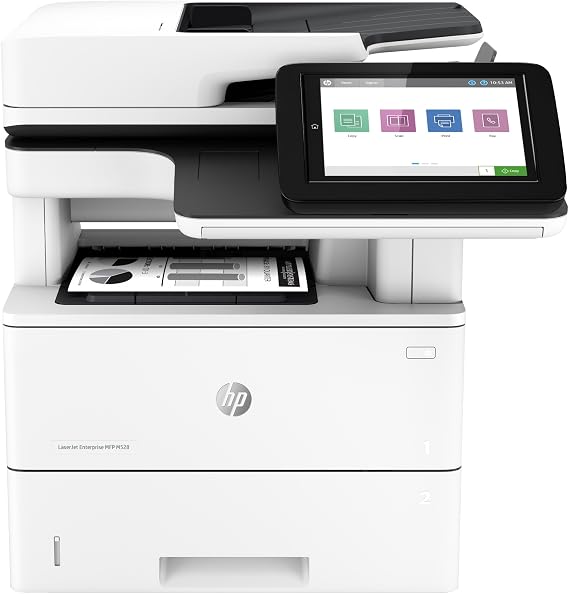
HP LaserJet Enterprise MFP M528dn Monochrome All-in-One Printer with Built-in Ethernet & 2-Sided Printing (1PV64A)
82% of respondents would recommend this to a friend
Item #:
28543507
XCD 6654
Price Details
Excluding Shipping & Custom charges ( Shipping and custom charges will be calculated on checkout )
*All items will import from US
0 ratings
Write a review
In stock
 Imported from USA store
QTY:
Order now and get it around Thursday, October 01
Secured transaction
Ubuy works hard to protect your security and privacy. Our advanced payment security system ensures confidentiality by encrypting your information during transmission using AES (Advanced Encryption Standards) and SSL (Secure Socket Layer) protocols. Your payment details are 100% secure as we do not share your payment details with third party sellers.
Our Top Logistics Partners


Choose an HP LaserJet Enterprise MFP designed to handle business solutions securely and efficiently, and helps conserve energy with HP Eco Smart toner black.

Fast
Shipping

Free
Return*

Secure Packaging

100% Original Products

PCI DSS Compliance

ISO 27001 Certified



What Stands Out
High-Speed Performance
The HP LaserJet M528dn delivers fast printing, scanning, and copying speeds, ensuring high productivity for busy work environments. Its efficiency minimizes waiting times, making it ideal for professional office settings.
Automatic Duplexing
This All-in-One printer features built-in double-sided printing, reducing paper usage and cost. This eco-friendly option enhances productivity by decreasing the need for manual paper flipping, benefiting both the environment and business operations.
Robust Network Connectivity
Equipped with built-in Ethernet, the M528dn facilitates easy network integration, allowing multiple users to share the printer seamlessly. This adds convenience and flexibility to office environments, streamlining workflow and enhancing collaboration.
Product Details
| Printer Type | Laser |
| Other Special Features of the Product | Auto-Duplex |
| Printer Output Type | Monochrome |
| Item Weight | 47.6 pounds (21.59 kg) |
| Controller Type | Android |
| Print media | Envelopes |
| Scanner Type | Flatbed |
| Maximum Copy Speed Black and White | 45 pages_per_minute |
| Compatible Devices | PC |
| Ink Color | Black |
| Additional Printer Functions | Copy, Fax, Scan |
| Control Method | App |
| Number of Trays | 2 |
| Processor Count | 1 |
| Display Type | LCD |
| Resolution | 1200 x 1200 |
| B&W Pages per Minute | 45 pages_per_minute |
| Color | White |
| Color Depth | 1 bpp |
| Printer Connectivity Type | Ethernet |
| Hardware Interface | Ethernet |
| Number of Ethernet Ports | 1 |
| Total USB 2.0 Ports | 3 |
| Total Usb Ports | 3 |
| Brand | HP |
| Model Name | LaserJet Enterprise M528dn |
| Model Number | M528dn |
| Built-In Media | HP LaserJet Enterprise MFP M528dn Printer; Regulatory flyer (CD replacement); Unpack flyer; Installation Guide; Power cord; Warranty Cards; Support flyers/phone number list; Control Panel. |
| Series Number | 528 |
| Model Series | LaserJet Enterprise M528dn |
| Specific Uses For Product | business |
| UPC | 192545079488 |
| Unit Count | 1 Count |
| Global Trade Identification Number | 00192545079488 |
| Item Type Name | Laser Printer |
| Manufacturer | HP |
| Maximum Media Size | 8.5 x 14 inch |
| Maximum Sheet Capacity | 550 |
| Paper Size | 3 x 5, 4 x 6, 5 x 7, 5 x 8, 8.5 x 13, 8.5 x 14 |
| Maximum Print Resolution Black and White | 1200 x 1200 dots_per_inch |
| Duplex | Automatic |
| Maximum Copy Resolution Black and White | 1200 x 1200 dpi |
| Connectivity Technology | Ethernet |
| Printing Technology | Laser |
| Special Feature | Auto-Duplex |
| Printer Output | Monochrome |
| Max Printspeed Monochrome | 45 pages_per_minute |
Who Should Buy?

-
Small Businesses
Ideal for small businesses needing efficient, high-volume printing, scanning, and copying with fast performance and low operating costs.
-
Workgroups
Perfect for workgroups requiring shared access to a reliable printer with advanced security features and networking capabilities.
-
High Volume Users
Suitably designed for users with heavy printing needs, providing quality monochrome outputs at high speeds and durability.

-
Casual Home Use
Not ideal for casual home users who print infrequently; the monochrome focus may limit versatility for color prints.
Product Description
HP LaserJet Enterprise MFP M528dn Monochrome All-in-One Printer with Built-in Ethernet & 2-Sided Printing (1PV64A)
Have any Query? Chat with us
Customer Questions & Answers
-
Question:
What printing technology does the HP LaserJet Enterprise MFP M528dn use?
Answer: The HP LaserJet Enterprise MFP M528dn utilizes advanced laser printing technology, which is known for producing high-quality, sharp monochrome text and graphics quickly. Laser technology is ideal for high-volume printing environments, as it offers rapid print speeds and efficient toner usage, making it perfect for businesses that require both efficiency and professionalism in their printed materials. -
Question:
Can I print double-sided documents with the HP LaserJet M528dn?
Answer: Yes, the HP LaserJet Enterprise MFP M528dn offers automatic duplex printing capabilities, allowing you to easily print double-sided documents. This feature helps reduce paper consumption and costs, making it an eco-friendly choice for organizations looking to minimize their environmental impact while maintaining professional document standards. -
Question:
What type of connectivity options does the M528dn provide?
Answer: The M528dn includes built-in Ethernet connectivity, which allows users to network the printer for shared access in a multi-user environment. This feature is ideal for businesses that require multiple team members to print from diverse devices, facilitating seamless integration into your existing network, alongside the option for USB connectivity for direct set-up. -
Question:
Can the HP LaserJet M528dn scan and copy documents?
Answer: Absolutely, the HP LaserJet Enterprise MFP M528dn is a multifunction printer that includes scanning and copying capabilities. The scanner provides fast and accurate document capture, making it suitable for digitizing physical papers or creating copies of essential records, streamlining office workflows and improving productivity. -
Question:
How can I manage and maintain the HP M528dn's printer settings?
Answer: The printer features an intuitive control panel and touchscreen for easy navigation through its functionalities, including settings management. Users can adjust print preferences, monitor toner levels, and perform maintenance tasks, such as cleaning and updating the firmware, directly from the display, ensuring ongoing performance and reliability. -
Question:
What is the print speed of the HP LaserJet Enterprise MFP M528dn?
Answer: The M528dn is capable of printing at speeds up to 45 pages per minute, significantly enhancing productivity in busy office environments. This high-speed performance makes it an excellent choice for organizations that require rapid document output without compromising on quality, making it ideal for large print jobs or frequent printing demands. -
Question:
Is the M528dn compatible with mobile printing solutions?
Answer: Yes, the HP LaserJet Enterprise MFP M528dn supports various mobile printing solutions, including HP ePrint and Apple AirPrint. This compatibility allows users to print documents directly from their smartphones or tablets conveniently, providing flexibility for on-the-go printing needs in modern work environments. -
Question:
What kind of media can I print on with the M528dn?
Answer: The HP M528dn can handle a variety of media types, including plain paper, envelopes, labels, cardstock, and more. It supports various media sizes from letter to legal and allows customization for specific print jobs, making it a versatile option for producing professional documents, marketing materials, or internal communications. -
Question:
Where can I buy the HP LaserJet Enterprise MFP M528dn in Anguilla?
Answer: You can purchase the HP LaserJet Enterprise MFP M528dn Monochrome All-in-One Printer on Ubuy, a reliable e-commerce platform that offers a wide selection of HP products and accessories. Ubuy provides an excellent shopping experience, ensuring that you can find the best deals and access additional customer support when needed. -
Question:
What are the dimensions of the HP LaserJet M528dn?
Answer: The overall dimensions of the HP LaserJet Enterprise MFP M528dn are approximately 19.6 inches in height, 18.4 inches in depth, and 18.6 inches in width. These compact dimensions make it suitable for various office environments, allowing for efficient space utilization while still delivering powerful performance and functionalities.
HP Laser Printers M528dn Editorial Review
No editorial reviews found
Customer Reviews & Ratings
1 customers ratings
-
5 Star
100%
-
4 Star
0%
-
3 Star
0%
-
2 Star
0%
-
1 Star
0%
Review this product
Share your thoughts with other customers
Platform Trust & Buyer Confidence

JK
Jasmin
Verified buyer
“Great products and very good service: very easy and very fast international delivery.”
9 September 2026 · via Trustpilot
AG
Anke
Verified buyer
“Wonderful online shopping experience, smooth transaction from the start. Payment method works conveniently and delivery is unexpectedly fast and reliable. You go the extra mile for service. What makes this even more amazing, you deliver to Namibia. I will remain a happy Ubuy customer and will increase my purchases for sure! Thank you!”
10 September 2026 · via Trustpilot
H
Hazel
Verified buyer
“Very easy to find the products what you need, and so fast delivery, that’s why I highly recommended to others costumers to used ubuy.”
10 September 2026 · via Trustpilot
O
Opaleye
Verified buyer
“I received exactly what I ordered I was skeptical about your site because that was my first time to order. But the order came timely and neatly packaged. I was not disappointed. Thank you.”
11 September 2026 · via Trustpilot
AC
Adele
Verified buyer
“Easy to find and order what you want on the website. Delivery is quick to the UK”
8 September 2026 · via Trustpilot
Secure Checkout
Global Delivery
Easy Returns
Genuine Products
Product Price History
Important information
- Limitations : For products shipped internationally, please note that any manufacturer warranty may not be valid; manufacturer service options may not be available; product manuals, instructions, and safety warnings may not be in destination country languages; the products (and accompanying materials) may not be designed in accordance with destination country standards, specifications, and labeling requirements; and the products may not conform to destination country voltage and other electrical standards (requiring use of an adapter or converter if appropriate). The recipient is responsible for assuring that the product can be lawfully imported to the destination country. When ordering from Ubuy or its affiliates, the recipient is the importer of record and must comply with all laws and regulations of the destination country.
- Not all the products listed on Ubuy are for sale, as Ubuy is a global search engine. Products are subject to export/trade regulations.
XCD 6654
Order now and get it around Thursday, October 01
This item is not restrict in my country.(Please click on above link if this item is not restrict in your country, So our team will review and allow.)
QTY:
Secured transaction
PCI DSS compliant and ISO 27001:2022 certified, with encrypted payments and full buyer protection on every order.
Our Top Logistics Partners
Fastest cross-border delivery
Features & Benefits
- Print consistently high-quality documents with the HP LaserJet Enterprise M608n
- The printer has the industry's strongest security with over 200 embedded security features
- Efficiently manage printing control and security policies with HP Web JetAdmin and HP JetAdvantage Security Manager
- Accelerate workflow and improve accuracy with convenient features like a stapler and Ethernet capabilities
- Keep your business moving with a Color touchscreen control panel, 2-sided Print and scan, and fast speeds of up to 45 pages per minute
- Save up to 29% energy with intelligent power features and trust in original HP toner cartridges for reliability
- One-year, next-business day, onsite support with free HP Websupport included
Ubuy Assurance
Experience worry-free shopping with 100% original products, PCI DSS-compliant payment security, ISO 27001-certified data protection, the fastest cross-border delivery, free returns *, and secure packaging on every order.