- Home Page /
- Electronics /
- Computer Accessories /
- Computer Accessories & Peripherals /
- Keyboards, Mice & Accessories /
- Computer Keyboards /
- Dell Business Multimedia Keyboard - KB522, Bl...
0 ratings


Item #:
7591257
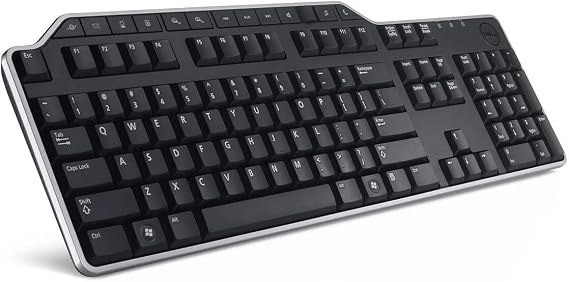
Dell Business Multimedia Keyboard - KB522, Black
85% of respondents would recommend this to a friend
Item #:
7591257
XCD 105
Price Details
Excluding Shipping & Custom charges ( Shipping and custom charges will be calculated on checkout )
*All items will import from US
0 ratings
Write a review
In stock
 Imported from USA store
QTY:
Order now and get it around Tuesday, September 29
Secured transaction
Ubuy works hard to protect your security and privacy. Our advanced payment security system ensures confidentiality by encrypting your information during transmission using AES (Advanced Encryption Standards) and SSL (Secure Socket Layer) protocols. Your payment details are 100% secure as we do not share your payment details with third party sellers.
Our Top Logistics Partners


Experience uninterrupted productivity with wireless keyboard mouse sets that help you complete tasks faster.

Fast
Shipping

Free
Return*

Secure Packaging

100% Original Products

PCI DSS Compliance

ISO 27001 Certified



What Stands Out
Ergonomic Design
The Dell KB522 keyboard features an ergonomic layout that promotes comfortable typing, reducing strain during long work sessions, ideal for professionals and office environments.
Multimedia Keys
Equipped with dedicated multimedia keys, this keyboard allows users to easily manage audio and video playback, enhancing productivity for media tasks and presentations.
Durable Build
Constructed with high-quality materials, the KB522 ensures longevity and resilience, making it a reliable choice for daily office use while providing excellent value for money.
Product Details
- Dell KB522 Business Multimedia Keyboard
- Color: Black
- Product Type: Keyboards
- Package Dimensions: 4.572 Cm L X17.78 Cm W X46.736 Cm H
- Country Of Origin: China
- Package Weight: 0.885 Kg
| Compatible Devices | PC |
| Connectivity Technology | Mini USB |
| Additional Features | multimedia keyboard |
| Keyboard Backlighting Color Support | RGB |
| Power Source | Wired |
| Switch Type | Tactile |
| Keyboard Layout | QWERTY |
| Hand Orientation | Ambidextrous |
| Button Quantity | 104 |
| Water Resistance Level | Water Resistant |
| Mechanical Keyboard Switch Model | Tactile |
| Compatible Operating System Family | Windows |
| Number of Keys | 104 |
| Number of Sections | 2 |
| Processor Count | 1 |
| Color | Black |
| Style Name | Contemporary |
| Theme | RGB |
| Item Dimensions L x W x H | 1.1"L x 9.7"W x 6.5"H (2.8 x 24.6 x 16.5 cm) |
| Enclosure Material | Plastic |
| Brand | Dell |
| Keyboard Description | Accessible |
| Antenna Location | Gaming, Office |
| Built-In Media | USB Cable |
| Model Number | KB522P |
| Model Name | KB522P |
| Series Number | 522 |
| Global Trade Identification Number | 00884116208105, 05397063800834 |
| Manufacturer | Dell, Inc |
| Number of Packs | 1 |
| UPC | 884116208105 |
| Number of Items | 1 |
| Generation | 1st Generation |
| Item Weight | 0.59 kg |
| Mfr Part Number | KB522P |
| Recommended Uses For Product | Gaming, Office |
| Special Feature | multimedia keyboard |
| Keyboard backlighting color support | RGB |
| Style | Contemporary |
| Product Dimensions (L x W x H) | 1.1"L x 9.7"W x 6.5"H (2.8 x 24.6 x 16.5 cm) |
Who Should Buy?

-
Office Workers
Ideal for office environments requiring reliability, multimedia controls, and comfortable typing for extended periods.
-
Multimedia Users
Great for users who frequently interact with media applications thanks to convenient multimedia shortcut keys.
-
Budget Buyers
Affordable option for those seeking a reliable keyboard without sacrificing essential features for everyday tasks.

-
Gaming Enthusiasts
Lacks advanced features like RGB lighting and programmable keys that serious gamers typically prefer in their keyboards.
Product Description
Dell Business Multimedia Keyboard - KB522, Black
About This Item
Enhance your business productivity with the Dell Business Multimedia Keyboard - KB522 in Black. This keyboard is specifically designed to meet the needs of professionals like you who value both functionality and style. The Dell KB522 Business Multimedia Keyboard is perfect for everyday office use. Its slim and sleek design not only complements your workspace but also provides a comfortable typing experience with its ergonomically designed keys.
Say goodbye to wrist strain and type with ease. Featuring multimedia hotkeys, this Dell keyboard allows you to easily control your media playback, adjust volume, and launch your most frequently used applications with just a press of a button. Say goodbye to searching for icons or navigating through menus - everything is just a click away. The Dell Business Multimedia Keyboard is perfect for both Windows and Mac users, ensuring seamless compatibility regardless of your operating system. Additionally, its wired connection guarantees a stable and responsive connection, so there are no delays or interruptions while you work. Built with durability in mind, the Dell KB522 keyboard is designed to withstand heavy daily use.
Its high-quality construction ensures that each keystroke is precise and reliable, making it the perfect keyboard for your office environment. Upgrade your office setup with the Dell Business Multimedia Keyboard - KB522 in Black. Experience enhanced productivity, ergonomic comfort, and intuitive functionality all in one sleek and stylish package. Don't settle for less - choose Dell for all your business needs.
Have any Query? Chat with us
Customer Questions & Answers
-
Question:
What are the key features of the Dell Business Multimedia Keyboard - KB522?
Answer: The Dell Business Multimedia Keyboard - KB522 boasts an array of features designed for productivity and comfort. It has multimedia keys for quick access to functions like volume control and play/pause, which enhance your workflow. The keyboard also features a spill-resistant design, making it durable and practical for office environments. This design is particularly beneficial if you're prone to accidental spills, ensuring longevity. It's ideal for professionals who require a reliable and efficient keyboard for daily tasks. -
Question:
Is the Dell Business Multimedia Keyboard - KB522 compatible with different operating systems?
Answer: Yes, the Dell Business Multimedia Keyboard - KB522 is compatible with multiple operating systems including Windows and Linux. This versatility allows users to connect the keyboard to different devices, making it suitable for varied workplace environments. Depending on your operating system, you may find specific drivers that enhance functionality. This makes it particularly useful for professionals who switch between different devices or who work in diverse technological landscapes. -
Question:
Does the Dell Business Multimedia Keyboard - KB522 come with backlighting?
Answer: No, the Dell Business Multimedia Keyboard - KB522 does not feature backlighting. While this may seem like a limitation, the absence of backlighting contributes to its straightforward design and simplicity. This is particularly advantageous in bright office settings where additional lighting is unnecessary. Users requiring a low-profile, functional keyboard for daytime office tasks will find this model highly effective without the distraction of lights. -
Question:
What is the design of the Dell Business Multimedia Keyboard - KB522?
Answer: The Dell Business Multimedia Keyboard - KB522 features a classic and functional design that prioritizes user comfort. It includes a full-size layout with a numeric keypad, ideal for data entry and similar tasks. The keys are designed for tactile feedback, enhancing typing speed and accuracy. This keyboard is perfect for business professionals who need a reliable tool for extensive typing sessions, ensuring productivity without compromising on comfort. -
Question:
Can the Dell Business Multimedia Keyboard - KB522 be used with a laptop?
Answer: Yes, the Dell Business Multimedia Keyboard - KB522 can be effectively used with a laptop. It connects via USB, making it easy to switch between the laptop's built-in keyboard and this external option. This is particularly useful for users who need a more ergonomic typing experience while working at a laptop for extended periods. It provides the additional comfort and functionality that's often lacking in standard laptop keyboards. -
Question:
What is the connectivity type for the Dell Business Multimedia Keyboard - KB522?
Answer: The Dell Business Multimedia Keyboard - KB522 uses a wired USB connection for reliable performance. This connectivity ensures a stable and responsive typing experience, free from issues that can arise with wireless keyboards such as interference or battery life concerns. It is especially beneficial in environments where consistent performance is crucial, like offices or workstations. Users will appreciate the straightforward plug-and-play capability without the hassle of configuring wireless settings. -
Question:
Can I customize the keys on the Dell Business Multimedia Keyboard - KB522?
Answer: The Dell Business Multimedia Keyboard - KB522 does not support direct key customization as seen in some high-end gaming keyboards. However, the multimedia keys provide quick access to essential functions out-of-the-box, streamlining various tasks. For users who require certain shortcuts frequently, this keyboard's design effectively caters to business needs without needing extensive customization. It's a solid choice for those looking for practical functionality over personalization. -
Question:
Is the Dell Business Multimedia Keyboard - KB522 suitable for gaming?
Answer: While the Dell Business Multimedia Keyboard - KB522 is primarily designed for business use, it can support casual gaming effectively. The keys provide decent tactile feedback, which can enhance gameplay for lighter gaming experiences. However, serious gamers might prefer keyboards with faster response times and dedicated gaming features. This keyboard is ideal for users who occasionally game but prioritize a productivity-oriented device for regular office tasks. -
Question:
What is the typing experience like on the Dell Business Multimedia Keyboard - KB522?
Answer: The typing experience on the Dell Business Multimedia Keyboard - KB522 is designed for comfort and efficiency. The keys offer responsive feedback, aiding in faster typing speeds without compromising accuracy. It has a standard layout, making it familiar to most users. This is particularly beneficial for professionals who spend considerable time typing documents or reports, allowing for a comfortable and productive work environment. -
Question:
Where can I buy the Dell Business Multimedia Keyboard - KB522 in Anguilla?
Answer: You can purchase the Dell Business Multimedia Keyboard - KB522 in Anguilla from Ubuy. They offer a reliable platform for sourcing this product, ensuring that you get a quality keyboard tailored for business use. Ubuy's user-friendly interface and efficient service make it a convenient choice for your keyboard needs.
Dell Keyboards KB522P Editorial Review
Dell Business Multimedia Keyboard - KB522, Black is designed for PC users looking for an efficient and comfortable typing experience. This wired keyboard features a tactile switch type and incorporates multimedia controls, including a volume knob and dedicated buttons for easy access to your favorite applications such as web browsers and calculators. Reviewers appreciate the responsive key action and the wrist rest that enhances comfort during extended use. Though some wish for backlighting, the overall value and performance have garnered positive feedback, with users noting its ability to keep up with high typing speeds. The keyboard also boasts a USB hub for added convenience, making it a reliable choice for professional settings.
Customer Reviews & Ratings
1 customers ratings
-
5 Star
100%
-
4 Star
0%
-
3 Star
0%
-
2 Star
0%
-
1 Star
0%
Review this product
Share your thoughts with other customers
Pros
- Tactile keys for comfortable typing experience
- Multimedia controls for easy access
- Volume knob simplifies sound adjustments
- Features a USB hub for convenience
- Wrist rest enhances user comfort
Cons
- Keyboard lacks backlighting for low-light use
Platform Trust & Buyer Confidence

JK
Jasmin
Verified buyer
“Great products and very good service: very easy and very fast international delivery.”
9 September 2026 · via Trustpilot
AG
Anke
Verified buyer
“Wonderful online shopping experience, smooth transaction from the start. Payment method works conveniently and delivery is unexpectedly fast and reliable. You go the extra mile for service. What makes this even more amazing, you deliver to Namibia. I will remain a happy Ubuy customer and will increase my purchases for sure! Thank you!”
10 September 2026 · via Trustpilot
H
Hazel
Verified buyer
“Very easy to find the products what you need, and so fast delivery, that’s why I highly recommended to others costumers to used ubuy.”
10 September 2026 · via Trustpilot
O
Opaleye
Verified buyer
“I received exactly what I ordered I was skeptical about your site because that was my first time to order. But the order came timely and neatly packaged. I was not disappointed. Thank you.”
11 September 2026 · via Trustpilot
AC
Adele
Verified buyer
“Easy to find and order what you want on the website. Delivery is quick to the UK”
8 September 2026 · via Trustpilot
Secure Checkout
Global Delivery
Easy Returns
Genuine Products
Product Price History
Important information
- Limitations : For products shipped internationally, please note that any manufacturer warranty may not be valid; manufacturer service options may not be available; product manuals, instructions, and safety warnings may not be in destination country languages; the products (and accompanying materials) may not be designed in accordance with destination country standards, specifications, and labeling requirements; and the products may not conform to destination country voltage and other electrical standards (requiring use of an adapter or converter if appropriate). The recipient is responsible for assuring that the product can be lawfully imported to the destination country. When ordering from Ubuy or its affiliates, the recipient is the importer of record and must comply with all laws and regulations of the destination country.
- Not all the products listed on Ubuy are for sale, as Ubuy is a global search engine. Products are subject to export/trade regulations.
XCD 105
Order now and get it around Tuesday, September 29
This item is not restrict in my country.(Please click on above link if this item is not restrict in your country, So our team will review and allow.)
QTY:
Secured transaction
PCI DSS compliant and ISO 27001:2022 certified, with encrypted payments and full buyer protection on every order.
Our Top Logistics Partners
Fastest cross-border delivery
Features & Benefits
- Enhance your productivity with wireless keyboard and mouse sets.
- Elegant and durable designs ensure everyday comfort.
- Exceptional mouse performance without compromising comfort.
- Laptop bags combine efficiency, functionality, and professional style.
- Powerful gaming monitors with fast response and high refresh rates.
- Clear sound in video conferencing with noise reduction microphones.
Ubuy Assurance
Experience worry-free shopping with 100% original products, PCI DSS-compliant payment security, ISO 27001-certified data protection, the fastest cross-border delivery, free returns *, and secure packaging on every order.