0 ratings


Item #:
19487391
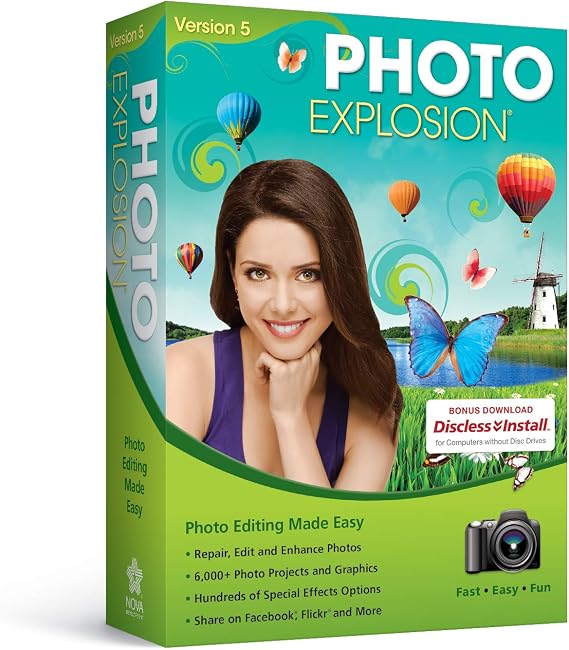
Photo Explosion 5.0
Item #:
19487391
XCD 115
Price Details
Excluding Shipping & Custom charges ( Shipping and custom charges will be calculated on checkout )
*All items will import from US
0 ratings
Write a review
In stock
 Imported from USA store
Order now and get it around Friday, July 17
Secured transaction
Ubuy works hard to protect your security and privacy. Our advanced payment security system ensures confidentiality by encrypting your information during transmission using AES (Advanced Encryption Standards) and SSL (Secure Socket Layer) protocols. Your payment details are 100% secure as we do not share your payment details with third party sellers.
Our Top Logistics Partners


Photo Explosion 5 makes creating with digital photography easier than ever with a brand new user interface and improved workflow for editing, archiving and sharing digital photographs.

Fast
Shipping

Free
Return*

Secure Packaging

100% Original Products

PCI DSS Compliance

ISO 27001 Certified


What Stands Out
User-Friendly Interface
Photo Explosion 5.0 offers an intuitive design that enables users of all skill levels to effortlessly create stunning photo projects, eliminating the steep learning curve often associated with digital photo editing software.
Extensive Templates
With a vast library of customizable templates, Photo Explosion 5.0 allows users to easily fulfill their creative visions for cards, calendars, and collages, making photo projects both accessible and enjoyable.
Advanced Editing Tools
This software features a suite of advanced editing tools, including filters, effects, and photo enhancement tools, empowering users to significantly elevate their images and achieve professional-level results without needing expensive software.
Product Details
- Millions of creative combinations with advanced color manipulation
- Unparalleled special effects and painting tools for stunning results
- Add backgrounds, frames, props, balloons, and more to enhance your photos
- Get started quickly with a helpful video tutorial
- Retouching tools to make any portrait picture perfect
- Easily remove red-eye, wrinkles, and other photo flaws with just one click
| Item Weight | 1 lbs (450 grams) |
Who Should Buy?

-
Casual Photographers
Ideal for users who want to edit and enhance personal photos without advanced technical skills. User-friendly interface.
-
Memory Keepers
Great for creating scrapbook projects and photo memories. Offers various templates for personalized keepsakes.
-
Social Media Users
Perfect for users wanting to create eye-catching graphics and collages to share on social media platforms.

-
Professional Editors
Not suitable for professionals requiring advanced editing tools and features that high-end software offers.
-
Minimalists
Users preferring simplicity and minimal features may find the added tools overwhelming and unnecessary.
-
Mac Users
Potential compatibility issues on Mac systems could lead to performance challenges or limited functionality.
Product Description
Photo Explosion 5.0
About This Item
Are you looking for a powerful and user-friendly software to revolutionize your photo editing experience? Look no further than Photo Explosion 5.0! This cutting-edge software has everything you need to bring your photos to life and take your creativity to new heights. With Photo Explosion 5.0, you can unleash your imagination with easy-to-use editing tools and stunning special effects. Let your photos shine with enhanced color and clarity, perfect blemish removal, and advanced retouching features. Whether you are a professional photographer or a hobbyist, this software will exceed your expectations. Downloading and installing Photo Explosion 5.0 is a breeze.
Simply visit our website and get ready to explore a world of endless possibilities. The user-friendly interface makes navigating through the software a breeze, allowing you to focus on what matters most - your photos. Windows 10 and Mac compatibility ensures that no matter what operating system you're using, Photo Explosion 5.0 will seamlessly integrate into your workflow. Upgrade your current software to version 5.0 and embrace the power of enhanced performance and expanded capabilities. Not sure where to start? No worries! Photo Explosion 5.0 offers comprehensive tutorials and support to help you make the most of every feature.
From basic edits to advanced techniques, we've got you covered. Our team of experts is always here to answer any questions and provide assistance when needed. Priced competitively, Photo Explosion 5.0 offers incredible value for the price. Don't break the bank for professional-grade software when you can get everything you need with Photo Explosion 5.0.
Plus, with free video tutorials, you'll be a pro in no time. Don't miss out on the opportunity to own this revolutionary photo editing software. Order your copy of Photo Explosion 5.0 today and bring your photos to life like never before. Unleash your creativity and capture breathtaking moments with ease.
Get ready to be amazed!.
Have any Query? Chat with us
Customer Questions & Answers
-
Question:
What features does Photo Explosion 5.0 offer for photo editing?
Answer: Photo Explosion 5.0 provides a comprehensive suite of photo editing tools including advanced retouching features, creative effects, and customizable templates. Users can enhance their images through filters, text overlays, and frames, ensuring a professional touch. Beyond basic editing, the software allows for detailed color adjustments and advanced layer management, making it ideal for both novice and experienced users. Whether you’re creating a scrapbook or preparing images for social media, Photo Explosion 5.0 equips you with tools to produce stunning visual content. -
Question:
Can I use Photo Explosion 5.0 for graphic design projects?
Answer: Yes, Photo Explosion 5.0 is versatile enough to be utilized for graphic design projects. It features tools that allow users to create invitations, posters, and other graphic materials seamlessly. With a library of templates and design elements, users can easily drag and drop components into their projects. This makes it a great resource for individuals or businesses looking to create promotional graphics or personalized designs without needing advanced design skills. -
Question:
What types of files can I import and export with Photo Explosion 5.0?
Answer: Photo Explosion 5.0 supports a variety of file formats for both import and export, including JPEG, PNG, BMP, and TIFF. This flexibility ensures that users can work with their preferred formats easily. Whether you're starting with photos from a digital camera or wanting to export a finished project for printing or online sharing, the software accommodates numerous formats to meet diverse user needs. This flexibility is especially beneficial for those who frequently share content across different platforms or require specific formats for printing. -
Question:
Is Photo Explosion 5.0 user-friendly for beginners?
Answer: Absolutely! Photo Explosion 5.0 is designed with an intuitive interface that caters to users of all skill levels, making it particularly friendly for beginners. The software includes guided tutorials and clear navigation, helping new users familiarize themselves with its capabilities without feeling overwhelmed. For instance, someone new to photo editing can easily learn to enhance their images or create artistic projects by following step-by-step instructions, allowing them to unlock their creativity while gaining confidence in their editing skills. -
Question:
Can Photo Explosion 5.0 be used for creating photo albums and collages?
Answer: Yes, one of the standout features of Photo Explosion 5.0 is its ability to create stunning photo albums and collages. Users can select from a variety of pre-designed layouts and easily drag and drop their photos into these templates. This feature is particularly useful for events like weddings, birthdays, or family gatherings, where one might want to encapsulate memories in a visually appealing format. By offering customization options, users can ensure that their albums reflect their unique style and storytelling. -
Question:
Does Photo Explosion 5.0 support printing directly from the software?
Answer: Yes, Photo Explosion 5.0 supports direct printing from the software, allowing users to produce physical copies of their edited photos without needing to export them separately. This function simplifies the workflow, as users can edit their images and print them in one go. For example, someone creating a last-minute gift, such as a framed photo or a printed card, can seamlessly transition from editing to printing, making it a convenient solution for personal and professional needs. -
Question:
What are the system requirements for Photo Explosion 5.0?
Answer: Photo Explosion 5.0 requires a compatible Windows operating system, ideally Windows 7 or later, along with a minimum of 2GB RAM and sufficient hard drive space to accommodate the software and user files. Having a modern processor and graphics card can also enhance performance, especially when editing high-resolution images. By ensuring your system meets these requirements, users can enjoy a smooth and efficient editing experience, allowing them to focus on creativity rather than technical issues. -
Question:
Can I find tutorials for Photo Explosion 5.0 online?
Answer: Yes, there are numerous online resources and tutorials available for Photo Explosion 5.0. Users can find video tutorials, forums, and blogs that provide tips and techniques specific to this software. This wealth of information is incredibly valuable for both beginners and seasoned users looking to refine their skills. Engaging with these tutorials allows users to discover advanced features and creative ways to utilize the software effectively, enhancing their overall experience and output. -
Question:
Can I customize the interface of Photo Explosion 5.0?
Answer: Photo Explosion 5.0 offers a customizable interface that allows users to tailor their workspace to suit their preferences. Users can adjust toolbars, icons, and layouts to enhance their workflow. This flexibility is particularly beneficial for those who use specific tools frequently, as they can streamline their editing process. For instance, a user focused on collage-making might prefer to have all relevant tools readily accessible, allowing for a more efficient creative experience. -
Question:
Where can I buy Photo Explosion 5.0 in Anguilla?
Answer: You can purchase Photo Explosion 5.0 from Ubuy in Anguilla. Ubuy is a trusted online retailer that offers a wide selection of software products, including Photo Explosion 5.0. Shoppers can enjoy the convenience of browsing through product specifications and selecting the ideal version for their needs, making Ubuy a reliable choice for your software purchases.
Nova Development US Lifestyle & Hobbies Editorial Review
Photo Explosion 5.0 is a photo editing software that has received mixed reviews from customers. While some customers have found it to be a disappointment compared to previous versions, others have had a positive experience with it. One common complaint among customers is that the auto adjust feature does not work as well as it did in previous versions. Users have reported that the pictures look worse or that there is no noticeable difference after using the auto adjust. Another issue that has been raised is the compatibility with Windows 10. Despite the product stating that it works with Windows 10, some customers have had trouble getting it to work on their computers. It has been reported that the software freezes up or does not properly install. On the positive side, some customers have had a smooth purchasing experience and received the product quickly. One customer even mentioned receiving a special surprise from the seller. Despite the mixed reviews, it is worth noting that there are customers who have had a positive experience with Photo Explosion 5.0. However, those looking to upgrade from a previous version or expecting a significant improvement might be disappointed.
Customer Reviews & Ratings
1 customers ratings
-
5 Star
100%
-
4 Star
0%
-
3 Star
0%
-
2 Star
0%
-
1 Star
0%
Review this product
Share your thoughts with other customers
Pros
- Quick delivery from seller
- Some customers have had a positive experience with the software
Cons
- Auto adjust feature does not work well
Platform Trust & Buyer Confidence

MT
Mohd
Verified buyer
“The product received very good packaging & safe…Thank You”
16 June 2026 · via Trustpilot
SJ
Shawati
Verified buyer
“Accurate delivery timing given”
16 June 2026 · via Trustpilot
YB
Youcef
Verified buyer
“Not madly expensive like I thought, and much quicker than promised.”
15 June 2026 · via Trustpilot
LM
Leila
Verified buyer
“Never dealt with Ubuy before, but everything worked out great. Seamless cross border purchasing and shipping. Thanks!”
6/7/2026 · via Trustpilot
KA
Kwame
Verified buyer
“The process was smooth, with clear communication and timelines. This was my 1st purchase and I am really impressed. I will definitely be coming back.”
12 June 2026 · via Trustpilot
Secure Checkout
Global Delivery
Easy Returns
Genuine Products
Product Price History
Important information
- Limitations : For products shipped internationally, please note that any manufacturer warranty may not be valid; manufacturer service options may not be available; product manuals, instructions, and safety warnings may not be in destination country languages; the products (and accompanying materials) may not be designed in accordance with destination country standards, specifications, and labeling requirements; and the products may not conform to destination country voltage and other electrical standards (requiring use of an adapter or converter if appropriate). The recipient is responsible for assuring that the product can be lawfully imported to the destination country. When ordering from Ubuy or its affiliates, the recipient is the importer of record and must comply with all laws and regulations of the destination country.
- Not all the products listed on Ubuy are for sale, as Ubuy is a global search engine. Products are subject to export/trade regulations.
XCD 115
Order now and get it around Friday, July 17
This item is not restrict in my country.(Please click on above link if this item is not restrict in your country, So our team will review and allow.)
QTY:
Secured transaction
PCI DSS compliant and ISO 27001:2022 certified, with encrypted payments and full buyer protection on every order.
Our Top Logistics Partners
Fastest cross-border delivery
Features & Benefits
- First software to deliver powerful editing features, special effects, and professional-quality photo projects in one program.
- Packed with more than 100 exciting new features and over 6,000 photo projects and graphics.
- Upload photos, slideshows, and video projects to popular social networking websites.
- Organize photos into on-screen albums with easy drag and drop interface.
- Compatible with all types of digital cameras and offers multimedia file browser/viewer.
- Includes editing features such as straighten, crop, adjust brightness, and remove red-eye for perfect portraits.
- Apply artistic effects like sepia, watercolor, cubism, monochrome, and blur backgrounds.
Ubuy Assurance
Experience worry-free shopping with 100% original products, PCI DSS-compliant payment security, ISO 27001-certified data protection, the fastest cross-border delivery, free returns *, and secure packaging on every order.