0 ratings




Item #:
18315545
VXDIAG VCX Nano GDS2 and Tech2Win Diagnostic Tool Compatible for GM/OPEL with Global Diagnostic Programming System GDS & GDS2
Item #:
18315545
XCD 538
Price Details
Excluding Shipping & Custom charges ( Shipping and custom charges will be calculated on checkout )
*All items will import from US
In stock
 Imported from USA store
Order now and get it around Saturday, July 04
Secured transaction
Ubuy works hard to protect your security and privacy. Our advanced payment security system ensures confidentiality by encrypting your information during transmission using AES (Advanced Encryption Standards) and SSL (Secure Socket Layer) protocols. Your payment details are 100% secure as we do not share your payment details with third party sellers.
Our Top Logistics Partners


Increase your revenue potential dramatically with VCX Nano - reprogram in just 45 minutes instead of two full hours!

Fast
Shipping

Free
Return*

Secure Packaging

100% Original Products

PCI DSS Compliance

ISO 27001 Certified


What Stands Out
Comprehensive Compatibility
Compatible with GM and Opel vehicles, this tool ensures extensive coverage of diagnostics, making it ideal for users who require versatile diagnostics for multiple vehicle brands.
Advanced Diagnostic Functions
Equipped with GDS and GDS2, it provides advanced diagnostic capabilities, enabling effective troubleshooting and programming that keeps your vehicle's systems running smoothly.
User-Friendly Design
The compact and portable design allows for easy handling and transportation, making it convenient for mechanics and DIY enthusiasts to diagnose vehicles quickly and efficiently on-the-go.
Product Details
- [Technical Support]: About vxdiag nano: Any network issues, hardware problems, server issues, or changes to the installation procedure may cause errors during the installation of VXDIAG vcx Nano. Please be sure to download the installation manual before proceeding. Alternatively, you can email us at any time. We are available to provide technical support and assist you with the installation online.
- [Vehicle Coverage] Installation Tips: Please turn off anti-virus software before install. otherwise, the system antivirus may delete the crack patch, causing the installation to fail. VXDIAG VCX NANO fully compatible with SAE-J2534-1 & SAE-J2534-2. All current and most legacy vehicle protocols: CAN, UART, KW2000, Class2, GM LAN, etc.
- [Functional] ●USB vehicle-to-PC connectivity● CE and FCC compliance for hardware●Firmware Updatable. 【SPS】Service Programming System: ◎Passthrough programming on GM past model and Global A vehicles◎Increase reprogramming speed 20-70% and get ready to service new models.
- [GDS] Global Diagnostic System: ◎New Diagnostic Application Software required for all GM Global Architecture (Global A) Vehicles. ◎GDS & GDS2 is software which runs on a specific PC. Updates received via TIS2Web.
- [Efficient&Convenience] Quick access to vehicle data for maintenance or management reports.Quickly attaches to vehicle's diagnostic connector. Mixed fleet capabilities with broad protocol support.May be used with desktop PC or laptop. make sure your computer at least 4GB.Tech2win software only installed on 7 32bit computer and on physical system. Please download the latest vxmanager from vxdiag official website.
- [Update firmware and license] Use new vxmanager to update firmware and driver and then update your device authorization. Please note: Vx nano does not support Windows Home, virtual machine systems, or macOS. Please install it on a professional computer.
| Power Source | Corded Electric |
| Operating System | Windows 10 |
| Screen Size | 4 Inches (10.2 cm) |
| Automotive Fit Type | Vehicle Specific Fit |
| Brand Name | VXDIAG |
| UPC | 889327034413 |
| Manufacturer | VXDIAG |
| Model Number | VXDIAG SP241 |
| Manufacturer Part Number | VXDIAG SP241 |
| Item Weight | 6.56 ounces (185.98 grams) |
| Included Components | VXDIAG VCX Nano GDS2 |
| Brand | VXDIAG |
What's in the box
VXDIAG VCX Nano GDS2
Who Should Buy?

-
Professional Mechanics
Ideal for professionals needing advanced diagnostic capabilities for GM and Opel vehicles efficiently.
-
Automotive Technicians
Great for technicians who perform regular maintenance and repairs on GM and Opel models with precision.
-
Hobbyist DIYers
Suitable for automotive enthusiasts looking to perform in-depth diagnostics and troubleshooting on their personal vehicles.

-
Casual Users
May be too complex for casual users who only require basic diagnostic tools without advanced features.
-
Non-GM Vehicles
Not suitable for users with vehicles outside the GM and Opel brands, as compatibility is limited.
-
Budget-Conscious Buyers
Might not be the best choice for those seeking a low-cost tool, given its advanced features and pricing.
Product Description
Have any Query? Chat with us
Customer Questions & Answers
-
Question:
What is the VXDIAG VCX Nano GDS2 and Tech2Win diagnostic tool?
Answer: The VXDIAG VCX Nano GDS2 and Tech2Win is a high-performance diagnostic tool designed for GM vehicles, enabling comprehensive system diagnostics and programming capabilities. It supports multiple protocols and provides access to the Anguilla Diagnostic Programming System (GDS) and GDS2, ensuring that you can perform advanced functions like module programming and system updates. This tool is essential for professional mechanics and DIY enthusiasts seeking to troubleshoot and maintain GM vehicles efficiently. -
Question:
How does the VXDIAG VCX Nano connect to a vehicle?
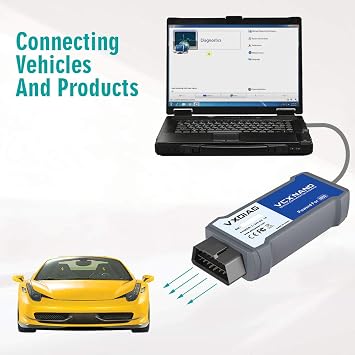
Answer: The VXDIAG VCX Nano connects to a vehicle through the OBD-II port, typically located beneath the dashboard. Once connected, it interfaces with various vehicle systems via Bluetooth or USB, providing access to diagnostic functions, live data, and troubleshooting information. This flexibility allows users to perform diagnostics without being tethered to a laptop, making it ideal for mobile mechanics or individuals conducting at-home repairs. -
Question:
Is the VXDIAG VCX Nano compatible with all GM models?
Answer: While the VXDIAG VCX Nano is designed to be compatible with a wide range of GM models, its effectiveness may vary based on the specific vehicle model and year. It works best with vehicles that utilize GDS and GDS2, covering most GM models from 2010 onward. To ensure compatibility, verifying the vehicle’s diagnostic system requirements before purchase is advisable. -
Question:
What types of diagnostics can the GDS2 software perform?
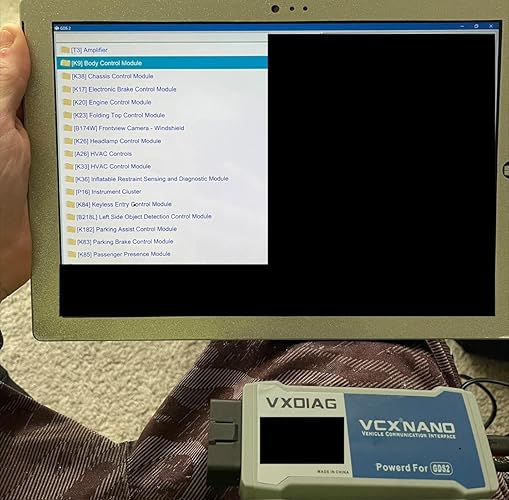
Answer: The GDS2 software can perform a variety of diagnostic functions, including reading and clearing diagnostic trouble codes (DTCs), viewing live vehicle data streams, performing module programming, and conducting system calibrations. These capabilities allow mechanics to pinpoint issues accurately, helping streamline repairs. Users can leverage the software for advanced testing and ensure their vehicle operates efficiently, making it a valuable tool for both everyday maintenance and in-depth diagnostics. -
Question:
What is the purpose of the Tech2Win application?
Answer: The Tech2Win application serves as a virtual version of the GM Tech 2 scan tool, providing users access to the same diagnostic features previously exclusive to the physical device. It allows users to perform diagnostics, programming, and calibrations on various GM vehicle systems. By integrating this application with the VXDIAG VCX Nano, users can efficiently diagnose problems and manage repairs, making it essential for those managing multiple GM vehicle models. -
Question:
Can I use VXDIAG VCX Nano in a professional workshop?
Answer: Yes, the VXDIAG VCX Nano is well-suited for professional workshops, offering robust diagnostic features typically found in high-end tools. Its compatibility with GDS, GDS2, and various GM vehicle protocols makes it versatile for diagnosing system errors and conducting repairs. Many automotive repair shops adopt this tool to enhance their service capabilities, providing their customers with reliable and efficient vehicle diagnostics. -
Question:
What are the system requirements for using VXDIAG VCX Nano with a computer?
Answer: To effectively use the VXDIAG VCX Nano with a computer, it is recommended to have a Windows operating system, preferably Windows 7, 8, or 10. The computer should have a minimum of 4GB RAM and sufficient storage for the GDS2 software installation. Additionally, a USB port or Bluetooth capability is required for connectivity. These specifications ensure smooth operation and efficient performance when diagnosing GM vehicles. -
Question:
How can I update the software for VXDIAG VCX Nano?
Answer: Updating the software for the VXDIAG VCX Nano is a straightforward process. Once connected to your computer, you can visit the manufacturer's official website or the support section of your diagnostic tool. There, users can download and install the latest versions of the GDS2 and Tech2Win applications. Keeping the software updated ensures access to the newest features and vehicle database enhancements, which are crucial for effective diagnostics. -
Question:
What if I encounter issues while using the VXDIAG VCX Nano?
Answer: If issues arise while using the VXDIAG VCX Nano, troubleshooting steps such as restarting the device, checking connections, or reinstalling the GDS2 software can often resolve common problems. Additionally, user manuals and online forums often provide specific guidance for various error codes or functionality concerns. For persistent issues, accessing dedicated customer support can ensure effective troubleshooting and restore the tool's capabilities. -
Question:
Where can I buy VXDIAG VCX Nano GDS2 and Tech2Win Diagnostic Tool in Anguilla?
Answer: You can buy the VXDIAG VCX Nano GDS2 and Tech2Win Diagnostic Tool from Ubuy in Anguilla. Ubuy is a reliable online platform that offers a wide variety of automotive tools and accessories, ensuring that you can find the product you need. With Ubuy, users can conveniently browse and purchase the VXDIAG VCX Nano, along with access to detailed product information and customer reviews to aid in your buying decision.
VXDIAG Code Readers & Scan Tools VXDIAG SP241 Editorial Review




The VXDIAG VCX Nano GDS2 and Tech2Win Diagnostic Tool is a versatile and powerful diagnostic tool that can work with a range of vehicles. However, there are some limitations when it comes to certain trucks, such as the F150. The software can be difficult to get working and users need to follow the instructions closely to ensure everything is downloaded in the proper order. One user tried the adapter on their F250 6.0l and found that it did not work and continually gave them a testman error at network diagnostics, making the product unusable for their vehicle. Additionally, the product does not work for any F-series trucks, according to a message from the seller. When it comes to programming a key fob, one user found that the tool worked for their smart keys but they needed to rent the Ford software. It may be easier and cheaper to get a dealer to do it. Overall, the VXDIAG VCX Nano GDS2 and Tech2Win Diagnostic Tool is a good option for those looking for a versatile diagnostic tool that can work with a range of vehicles. However, users need to be aware of the limitations and difficulties with getting the software working properly.
Customer Reviews & Ratings
444 customers ratings
-
5 Star
50%
-
4 Star
10%
-
3 Star
5%
-
2 Star
6%
-
1 Star
29%
Review this product
Share your thoughts with other customers
Pros
- Versatile and powerful diagnostic tool
- Can work with a range of vehicles
- Allows for programming of smart keys
Cons
- Limited compatibility with certain trucks, such as F150 and F-series trucks
Product Price History
Important information
- Limitations : For products shipped internationally, please note that any manufacturer warranty may not be valid; manufacturer service options may not be available; product manuals, instructions, and safety warnings may not be in destination country languages; the products (and accompanying materials) may not be designed in accordance with destination country standards, specifications, and labeling requirements; and the products may not conform to destination country voltage and other electrical standards (requiring use of an adapter or converter if appropriate). The recipient is responsible for assuring that the product can be lawfully imported to the destination country. When ordering from Ubuy or its affiliates, the recipient is the importer of record and must comply with all laws and regulations of the destination country.
- Not all the products listed on Ubuy are for sale, as Ubuy is a global search engine. Products are subject to export/trade regulations.
XCD 538
Order now and get it around Saturday, July 04
This item is not restrict in my country.(Please click on above link if this item is not restrict in your country, So our team will review and allow.)
QTY:
Secured transaction
Ubuy works hard to protect your security and privacy. Our advanced payment security system ensures confidentiality by encrypting your information during transmission using AES (Advanced Encryption Standards) and SSL (Secure Socket Layer) protocols. Your payment details are 100% secure as we do not share your payment details with third party sellers.
Our Top Logistics Partners
Fastest cross-border delivery
Features & Benefits
- Enhanced productivity: reprograms in 45 minutes vs. 2 hours.
- Compatible with GM, Chevrolet, Cadillac, GMC, and more vehicles from 2000 to 2025.
- Supports multiple software applications, minimizing investment in multiple tools.
- Tech2Win application offers all features of the Tech 2 interface.
- Ideal for garages and workshops aiming to increase service efficiency.
- User-friendly installation and operation, requiring only Windows 10 64-bit OS.